Use CoolBox numeric and graphics modules
Install CoolBox using the Python setup tutorial. The native graphics API renders charts without a separate plotting library. When installed with pip, the Python package installs its declared NumPy dependency automatically.
1. Create labeled groups
Create a six-row, five-feature matrix in each language. Labels are used only to color the chart. For PCA, the Python binding accepts a NumPy-compatible array while the native C++ API accepts its matrix type; Go and Rust bindings expose matrix operations but not PCA.
import numpy as np
import ml_toolbox as ml
from ml_toolbox import matrix

dr = ml.ml_core.dimensionality_reduction
graphics = ml.ml_core.graphics

X = matrix.DenseMatrix.from_rows([
    [0.2, 0.1, 0.4, 0.0, 0.3],
    [0.0, 0.3, 0.1, 0.2, 0.4],
    [1.1, 1.0, 1.2, 0.8, 1.1],
    [0.9, 1.2, 1.0, 1.1, 0.8],
    [2.0, 2.1, 1.8, 2.2, 1.9],
    [2.2, 1.9, 2.1, 1.8, 2.2],
])
labels = [0, 0, 1, 1, 2, 2]package main
import (
"fmt"
"log"
coolbox "github.com/MeanderingAI/CoolBox/_deliverables/libraries/bindings/go_bindings"
)
func main() {
values := []float64{
0.2, 0.1, 0.4, 0.0, 0.3,
0.0, 0.3, 0.1, 0.2, 0.4,
1.1, 1.0, 1.2, 0.8, 1.1,
0.9, 1.2, 1.0, 1.1, 0.8,
2.0, 2.1, 1.8, 2.2, 1.9,
2.2, 1.9, 2.1, 1.8, 2.2,
}
X, err := coolbox.DenseMatrixFromData(6, 5, values)
if err != nil { log.Fatal(err) }
defer X.Close()
labels := []int{0, 0, 1, 1, 2, 2}
rows, err := X.Rows()
if err != nil { log.Fatal(err) }
columns, err := X.Columns()
if err != nil { log.Fatal(err) }
fmt.Printf("Input shape: %d x %d; labels: %v\n", rows, columns, labels)
}use coolbox_rs::DenseMatrix;
fn main() -> Result<(), String> {
let values = [
0.2, 0.1, 0.4, 0.0, 0.3,
0.0, 0.3, 0.1, 0.2, 0.4,
1.1, 1.0, 1.2, 0.8, 1.1,
0.9, 1.2, 1.0, 1.1, 0.8,
2.0, 2.1, 1.8, 2.2, 1.9,
2.2, 1.9, 2.1, 1.8, 2.2,
];
let x = DenseMatrix::from_data(6, 5, &values)?;
let labels = [0, 0, 1, 1, 2, 2];
println!("Input shape: {:?}", x.shape());
println!("Group labels: {:?}", labels);
Ok(())
}#include <iostream>
#include <vector>
#include "pca.h"
int main() {
using dimensionality_reduction::PCA;
const std::vector<double> values{
0.2, 0.1, 0.4, 0.0, 0.3,
0.0, 0.3, 0.1, 0.2, 0.4,
1.1, 1.0, 1.2, 0.8, 1.1,
0.9, 1.2, 1.0, 1.1, 0.8,
2.0, 2.1, 1.8, 2.2, 1.9,
2.2, 1.9, 2.1, 1.8, 2.2,
};
PCA::Matrix X(values, 6, 5);
const std::vector<int> labels{0, 0, 1, 1, 2, 2};
std::cout << "Input shape: " << X.rows() << " x " << X.cols()
<< "; labeled samples: " << labels.size() << '\n';
}2. Project with CoolBox PCA
CoolBox provides PCA through Python and its C++ core. Go and Rust have matrix operations, but do not currently expose a PCA estimator on main; their tabs explain the limitation and link to the binding notes.
X_for_pca = np.asarray(X.data, dtype=float).reshape(X.shape)
pca = dr.PCA(n_components=2, center=True, scale=False)
X_2d = pca.fit_transform(X_for_pca)
variance = pca.get_explained_variance_ratio()
PCA is not currently exposed in CoolBox's Go binding. The Go package can create and operate on dense matrices, but cannot fit this PCA estimator. See the Go binding support notes .
PCA is not currently exposed in CoolBox's Rust crate. The Rust API can create and operate on dense matrices, but cannot fit this PCA estimator. See the Rust binding support notes .
CoolBox's C++ core accepts its native PCA matrix type.
dimensionality_reduction::PCA pca(2, true, false);
const auto X_2d = pca.fit_transform(X);
const auto variance = pca.get_explained_variance_ratio();
3. Draw and save the graph
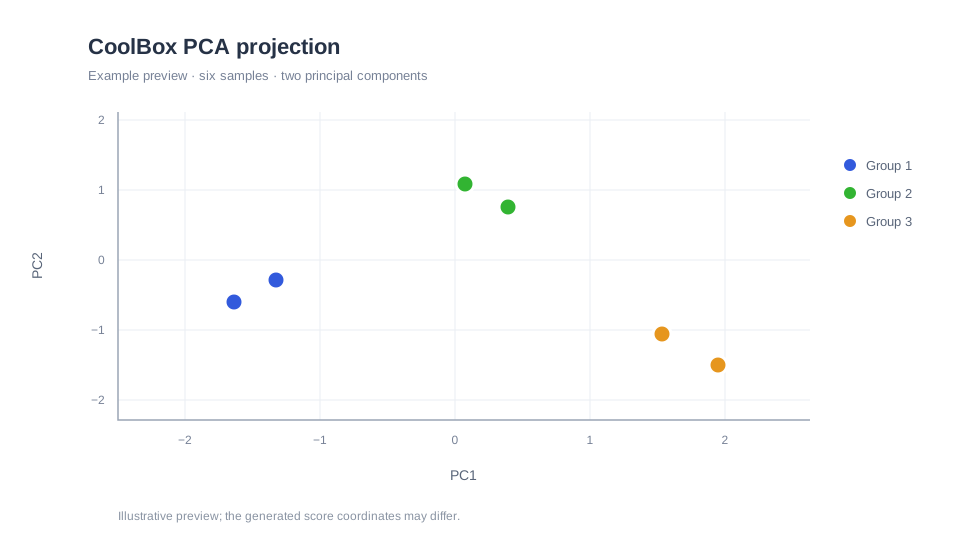
Plot each group as a separate labeled series and save the PNG with CoolBox's built-in chart renderer. No external plotting library is needed.
Choose a language to see its charting code. Go and Rust can draw the chart, but currently need PCA coordinates computed by another tool.
graph = graphics.Graph(800, 500, graphics.GraphType.SCATTER)
graph.set_title("CoolBox PCA projection")
graph.set_x_label(f"PC1 ({variance[0]:.1%} variance)")
graph.set_y_label(f"PC2 ({variance[1]:.1%} variance)")

colors = [graphics.BLUE, graphics.GREEN, graphics.ORANGE]
for group_id, color in enumerate(colors):
    points = [index for index, label in enumerate(labels) if label == group_id]
    graph.add_series(graphics.DataSeries(
        f"Group {group_id + 1}",
        [X_2d[index, 0] for index in points],
        [X_2d[index, 1] for index in points],
        color,
    ))

canvas = graph.render()
if not canvas.save_png("pca_2d_visualization.png"):
    raise RuntimeError("CoolBox could not save the PCA chart")
print("Saved pca_2d_visualization.png")
The Go binding includes charting, but no PCA estimator on main. Replace the illustrative coordinates with PCA scores computed elsewhere.
package main

import (
    "log"

    coolbox "github.com/MeanderingAI/CoolBox/_deliverables/libraries/bindings/go_bindings"
)

func main() {
    group1PC1, group1PC2 := []float64{-1.2, -0.8}, []float64{-0.3, 0.2}
    group2PC1, group2PC2 := []float64{0.1, 0.5}, []float64{1.1, 0.8}
    group3PC1, group3PC2 := []float64{1.4, 1.8}, []float64{-0.7, -1.0}

    graph, err := coolbox.NewGraph(800, 500, coolbox.ScatterGraph)
    if err != nil { log.Fatal(err) }
    defer graph.Close()
    if err := graph.SetTitle("CoolBox PCA projection"); err != nil { log.Fatal(err) }
    if err := graph.SetXLabel("PC1"); err != nil { log.Fatal(err) }
    if err := graph.SetYLabel("PC2"); err != nil { log.Fatal(err) }

    series := []coolbox.Series{
        {Label: "Group 1", X: group1PC1, Y: group1PC2, Color: coolbox.Blue},
        {Label: "Group 2", X: group2PC1, Y: group2PC2, Color: coolbox.Green},
        {Label: "Group 3", X: group3PC1, Y: group3PC2, Color: coolbox.Orange},
    }
    for _, item := range series {
        if err := graph.AddSeries(item); err != nil { log.Fatal(err) }
    }
    if err := graph.SavePNG("pca_2d_visualization.png"); err != nil {
        log.Fatal(err)
    }
}
The Rust crate includes charting, but no PCA estimator on main. Replace the illustrative coordinates with PCA scores computed elsewhere.
use coolbox_rs::{Color, Graph, GraphType, ImageFormat};

fn main() -> Result<(), String> {
    let group1_pc1 = vec![-1.2, -0.8];
    let group1_pc2 = vec![-0.3, 0.2];
    let group2_pc1 = vec![0.1, 0.5];
    let group2_pc2 = vec![1.1, 0.8];
    let group3_pc1 = vec![1.4, 1.8];
    let group3_pc2 = vec![-0.7, -1.0];

    let mut graph = Graph::new(800, 500, GraphType::Scatter)?;
    graph.set_title("CoolBox PCA projection")?;
    graph.set_x_label("PC1")?;
    graph.set_y_label("PC2")?;

    graph.add_series("Group 1", &group1_pc1, &group1_pc2,
        Color { red: 82, green: 120, blue: 216, alpha: 255 })?;
    graph.add_series("Group 2", &group2_pc1, &group2_pc2,
        Color { red: 100, green: 162, blue: 123, alpha: 255 })?;
    graph.add_series("Group 3", &group3_pc1, &group3_pc2,
        Color { red: 217, green: 150, blue: 85, alpha: 255 })?;

    let canvas = graph.render()?;
    canvas.save("pca_2d_visualization.png", ImageFormat::Png, 100)?;
    Ok(())
}
CoolBox’s C++ core provides PCA as well as graphics. Feed the PCA score columns directly into the native chart renderer.
#include <stdexcept>
#include <string>
#include <vector>
#include "pca.h"
#include "graphics.h"

int main() {
    using dimensionality_reduction::PCA;
    using namespace graphics;

    const std::vector<double> values{
        0.2, 0.1, 0.4, 0.0, 0.3,
        0.0, 0.3, 0.1, 0.2, 0.4,
        1.1, 1.0, 1.2, 0.8, 1.1,
        0.9, 1.2, 1.0, 1.1, 0.8,
        2.0, 2.1, 1.8, 2.2, 1.9,
        2.2, 1.9, 2.1, 1.8, 2.2,
    };
    PCA::Matrix X(values, 6, 5);
    PCA pca(2, true, false);
    const auto scores = pca.fit_transform(X);

    const std::vector<int> labels{0, 0, 1, 1, 2, 2};
    const std::vector<Color> colors{
        Colors::Blue, Colors::Green, Colors::Orange
    };
    Graph graph(800, 500, GraphType::Scatter);
    graph.set_title("CoolBox PCA projection");
    graph.set_x_label("PC1");
    graph.set_y_label("PC2");
    for (int group = 0; group < 3; ++group) {
        std::vector<double> x, y;
        for (int row = 0; row < 6; ++row) {
            if (labels[row] == group) {
                x.push_back(scores(row, 0));
                y.push_back(scores(row, 1));
            }
        }
        graph.add_series({"Group " + std::to_string(group + 1),
                          x, y, colors[group]});
    }

    const Canvas canvas = graph.render();
    if (!canvas.save_png("pca_2d_visualization.png")) {
        throw std::runtime_error("CoolBox could not save the PCA chart");
    }
    return 0;
}
Read the plot with care
Nearby points have similar coordinates in the projected view, but a 2D projection can hide structure from the other features. Look at the explained-variance values and compare alternative scaling choices before drawing conclusions.
This walkthrough uses CoolBox’s native PCA, matrix, and graphics APIs where the language binding provides them. See the repository’s PCA visualization example for additional plotting workflows.