How boosting works
Gradient boosting builds an ensemble in rounds. Each added tree helps reduce the current prediction error; the learning rate controls how much each tree contributes. CoolBox provides boosted-tree regression and a classifier for binary or multiclass labels.
This walkthrough uses BoostTreeClassifier. Its trees are regression learners trained against class-probability residuals, with softmax probabilities for multiclass classification.
1. Prepare a nonlinear dataset
The XOR-shaped labels make a useful small classification example: the class changes by region rather than following one straight boundary. Keep the test rows separate so you can inspect predictions on samples the model did not fit.
2. Configure and fit the ensemble
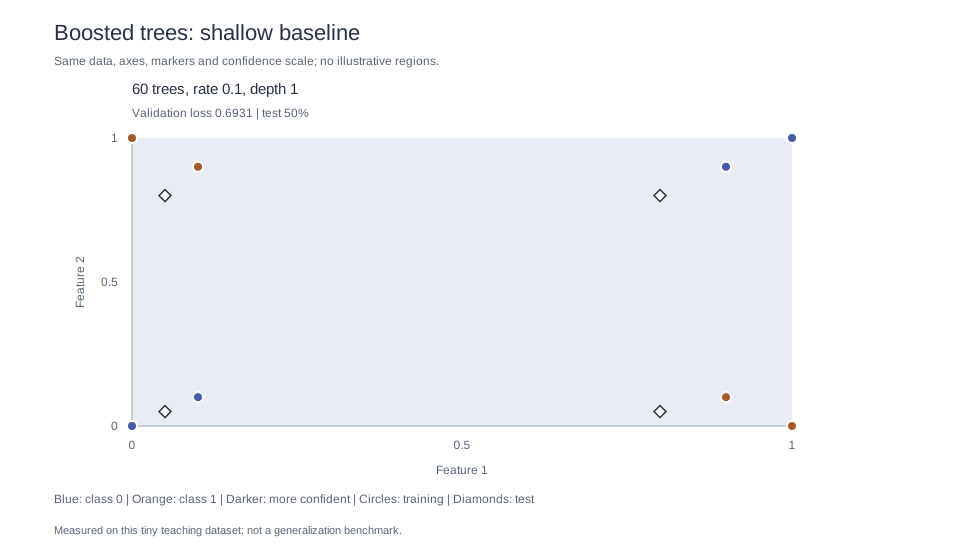
num_estimators sets the boosting rounds, learning_rate scales each tree's contribution, and max_depth limits tree complexity. Start with depth one deliberately: individual stumps cannot represent XOR's feature interaction, so this underfit baseline gives the search a meaningful depth choice to improve.
3. Predict and check accuracy
Use the fitted model to classify each held-out row. The classifier also returns class probabilities; their order matches the sorted labels returned by classes(). Results can vary with implementation changes, so treat this tiny example as a learning exercise rather than a benchmark.
Choose a language for a complete baseline example. Current CoolBox bindings expose boosted-tree classifiers in Python, Go, and Rust, alongside the native C++ API. Rebuild older bindings if these APIs are missing.
from ml_toolbox import decision_tree as trees

# XOR-like regions: the class cannot be separated by one straight line.
X_train = [
    [0.0, 0.0], [0.0, 1.0], [1.0, 0.0], [1.0, 1.0],
    [0.1, 0.1], [0.1, 0.9], [0.9, 0.1], [0.9, 0.9],
]
y_train = [0, 1, 1, 0, 0, 1, 1, 0]

X_test = [[0.05, 0.8], [0.8, 0.05], [0.05, 0.05], [0.8, 0.8]]
y_test = [1, 1, 0, 0]

params = trees.BoostTreeParameters()
params.num_estimators = 60
params.learning_rate = 0.1
params.max_depth = 1

model = trees.BoostTreeClassifier(params)
model.fit(X_train, y_train)

classes = model.classes()
correct = 0
for sample, expected in zip(X_test, y_test):
    predicted = model.predict(sample)
    probabilities = model.predict_proba(sample)
    correct += predicted == expected
    print(
        f"{sample} -> class {predicted}; "
        f"probabilities {dict(zip(classes, probabilities))}"
    )

print(f"Test accuracy: {correct / len(y_test):.0%}")package main
import (
"fmt"
"log"
coolbox "github.com/MeanderingAI/CoolBox/_deliverables/libraries/bindings/go_bindings"
)
func run() error {
training := [][]float64{
{0, 0}, {0, 1}, {1, 0}, {1, 1},
{0.1, 0.1}, {0.1, 0.9}, {0.9, 0.1}, {0.9, 0.9},
}
labels := []int{0, 1, 1, 0, 0, 1, 1, 0}
test := [][]float64{{0.05, 0.8}, {0.8, 0.05}, {0.05, 0.05}, {0.8, 0.8}}
expected := []int{1, 1, 0, 0}
model, err := coolbox.NewBoostTreeClassifier(coolbox.BoostTreeParameters{
NumEstimators: 60, LearningRate: 0.1, MaxDepth: 1,
})
if err != nil { return err }
defer model.Close()
if err := model.Fit(training, labels); err != nil { return err }
classes, err := model.Classes()
if err != nil { return err }
correct := 0
for i, row := range test {
predicted, err := model.Predict(row)
if err != nil { return err }
probabilities, err := model.PredictProba(row)
if err != nil { return err }
if predicted == expected[i] { correct++ }
fmt.Printf("%v -> %d; classes %v, probabilities %v\n",
row, predicted, classes, probabilities)
}
fmt.Printf("Test accuracy: %.0f%%\n", 100*float64(correct)/float64(len(test)))
return nil
}
func main() {
if err := run(); err != nil { log.Fatal(err) }
}use coolbox_rs::{BoostTreeClassifier, BoostTreeParameters};
fn main() -> Result<(), String> {
let training = vec![
vec![0.0, 0.0], vec![0.0, 1.0], vec![1.0, 0.0], vec![1.0, 1.0],
vec![0.1, 0.1], vec![0.1, 0.9], vec![0.9, 0.1], vec![0.9, 0.9],
];
let labels = [0, 1, 1, 0, 0, 1, 1, 0];
let test = [vec![0.05, 0.8], vec![0.8, 0.05], vec![0.05, 0.05], vec![0.8, 0.8]];
let expected = [1, 1, 0, 0];
let mut model = BoostTreeClassifier::new(BoostTreeParameters {
num_estimators: 60, learning_rate: 0.1, max_depth: 1,
})?;
model.fit(&training, &labels)?;
let classes = model.classes()?;
let mut correct = 0;
for (row, target) in test.iter().zip(expected) {
let predicted = model.predict(row)?;
let probabilities = model.predict_proba(row)?;
if predicted == target { correct += 1; }
println!("{row:?} -> {predicted}; classes {classes:?}, probabilities {probabilities:?}");
}
println!("Test accuracy: {:.0}%", 100.0 * correct as f64 / test.len() as f64);
Ok(())
}#include <cstddef>
#include <iostream>
#include <vector>
#include <boost_tree.h>
int main() {
const std::vector<std::vector<double>> X_train{
{0.0, 0.0}, {0.0, 1.0}, {1.0, 0.0}, {1.0, 1.0},
{0.1, 0.1}, {0.1, 0.9}, {0.9, 0.1}, {0.9, 0.9},
};
const std::vector<int> y_train{0, 1, 1, 0, 0, 1, 1, 0};
const std::vector<std::vector<double>> X_test{
{0.05, 0.8}, {0.8, 0.05}, {0.05, 0.05}, {0.8, 0.8},
};
const std::vector<int> y_test{1, 1, 0, 0};
BoostTreeParameters params;
params.num_estimators = 60;
params.learning_rate = 0.1;
params.max_depth = 1;
BoostTreeClassifier model(params);
model.fit(X_train, y_train);
int correct = 0;
for (std::size_t i = 0; i < X_test.size(); ++i) {
const int predicted = model.predict(X_test[i]);
const auto probabilities = model.predict_proba(X_test[i]);
if (predicted == y_test[i]) {
++correct;
}
std::cout << "Expected " << y_test[i]
<< ", predicted " << predicted << "; probabilities:";
for (std::size_t j = 0; j < probabilities.size(); ++j) {
std::cout << " class " << model.classes()[j]
<< "=" << probabilities[j];
}
std::cout << '\n';
}
std::cout << "Test accuracy: "
<< static_cast<double>(correct) / y_test.size() << '\n';
}
In C++, build CoolBox with the C++ setup guide and link the exported CoolBox::decision_tree target. The Python binding can be installed with the Python setup guide.
4. Tune with genetic search
Search over tree count, learning rate, and maximum depth with CoolBox's genetic optimizer. Each candidate trains a fresh classifier on the same training rows; its fitness is validation log loss, which the optimizer minimizes. Unlike accuracy, this score can distinguish confidence improvements even when both models classify every validation row correctly.
Use a separate validation set for tuning. Keep the four test rows from step 3 out of the objective and the model-selection rule. The eight training samples are only a teaching example; a real project needs a larger representative split or cross-validation.
Download the complete Python search and plotting example. The excerpt below summarizes the helpers inside its train() function. Run the downloaded file, rather than this excerpt alone.
from ml_toolbox import opt

# Separate from both the training rows and the final test rows.
X_validation = [
    [0.25, 0.25], [0.25, 0.75], [0.75, 0.25], [0.75, 0.75],
    [0.35, 0.35], [0.35, 0.65], [0.65, 0.35], [0.65, 0.65],
]
y_validation = [0, 1, 1, 0, 0, 1, 1, 0]

# Each gene is in [0, 1]. The helper maps them to:
# 20..100 trees, 0.03..0.20 learning rate, and depth 1..4.
initial = [0.5, (0.1 - 0.03) / 0.17, 0.0]
baseline = fit(initial)
baseline_loss = log_loss(baseline, X_validation, y_validation)

# Config order: dimensions, population, generations, tournament,
# crossover, mutation, mutation sigma, lower bound, upper bound, seed.
search = opt.Optimizer(
    opt.OptimizerType.GENETIC_SEARCH,
    [3, 12, 8, 3, 0.85, 0.2, 0.15, 0.0, 1.0, 42],
)

def objective(genes):
    return log_loss(fit(genes), X_validation, y_validation)

winner = search.optimize(objective, initial)
candidate = fit(winner)
candidate_loss = log_loss(candidate, X_validation, y_validation)
improved = candidate_loss < baseline_loss
selected = candidate if improved else baseline
selected_loss = candidate_loss if improved else baseline_loss
print(f"Validation log loss: {baseline_loss:.4f} -> {selected_loss:.4f}")
Download the complete Go training and genetic-search example. This excerpt uses its fit and loss helpers, propagates callback errors, and never uses test labels to select parameters. Run the complete file in a Go module configured for the current CoolBox bindings.
config := coolbox.DefaultGeneticSearchConfig()
config.Dimensions, config.PopulationSize, config.Generations = 3, 12, 8
config.MutationRate, config.MutationSigma = 0.2, 0.15
config.LowerBound, config.UpperBound, config.Seed = 0, 1, 42
search, err := coolbox.NewSearchOptimizer(coolbox.GeneticSearchOptimizer, config)
if err != nil { return err }
defer search.Close()
var objectiveErr error
winner, err := search.Optimize(func(genes []float64) float64 {
    if objectiveErr != nil { return math.Inf(1) }
    model, fitErr := fit(genes)
    if fitErr != nil { objectiveErr = fitErr; return math.Inf(1) }
    defer model.Close()
    score, scoreErr := loss(model)
    if scoreErr != nil { objectiveErr = scoreErr; return math.Inf(1) }
    return score
}, []float64{0.5, (0.1 - 0.03) / 0.17, 0})
if objectiveErr != nil { return fmt.Errorf("search objective: %w", objectiveErr) }
if err != nil { return err }
candidate, err := fit(winner)
if err != nil { return err }
defer candidate.Close()
Download the complete Rust training and genetic-search example. This excerpt uses its fit and loss helpers. Copy the complete file into your application's src/main.rs after adding the current CoolBox crate.
let mut search = SearchOptimizer::new(
    OptimizerType::GeneticSearch,
    &[3.0, 12.0, 8.0, 3.0, 0.85, 0.2, 0.15, 0.0, 1.0, 42.0],
)?;
let mut objective_error = None;
let search_result = search.optimize(&mut |genes| {
    if objective_error.is_some() { return f64::INFINITY; }
    match fit(genes, &training, &labels)
        .and_then(|model| loss(&model, &validation, &labels)) {
        Ok(score) => score,
        Err(error) => {
            objective_error = Some(error);
            f64::INFINITY
        }
    }
}, &[0.5, (0.1 - 0.03) / 0.17, 0.0]);
if let Some(error) = objective_error {
    return Err(format!("search objective: {error}"));
}
let winner = search_result?;
let candidate = fit(&winner, &training, &labels)?;
Add genetic_search.h, algorithm, and cmath to the step 3 includes, and insert this inside main() after fitting the baseline. Link CoolBox::genetic_search as well as CoolBox::decision_tree when using the installed CMake package. Alternatively, download the complete native experiment used to produce the on-page predictions; pass an output JSON filename when running it.
const std::vector<std::vector<double>> validation{
    {0.25, 0.25}, {0.25, 0.75}, {0.75, 0.25}, {0.75, 0.75},
    {0.35, 0.35}, {0.35, 0.65}, {0.65, 0.35}, {0.65, 0.65},
};
const std::vector<int> labels{0, 1, 1, 0, 0, 1, 1, 0};
auto loss = [&](const BoostTreeClassifier& classifier) {
    double total = 0.0;
    const auto& classes = classifier.classes();
    for (std::size_t i = 0; i < validation.size(); ++i) {
        const auto index = std::find(classes.begin(), classes.end(), labels[i])
                         - classes.begin();
        const auto probabilities = classifier.predict_proba(validation[i]);
        total -= std::log(std::max(1e-15, probabilities[index]));
    }
    return total / labels.size();
};
auto decode = [](const std::vector<double>& genes) {
    BoostTreeParameters candidate;
    candidate.num_estimators = 20 + static_cast<unsigned>(80 * genes[0] + 0.5);
    candidate.learning_rate = 0.03 + 0.17 * genes[1];
    candidate.max_depth = 1 + static_cast<unsigned>(3 * genes[2] + 0.5);
    return candidate;
};
opt::GeneticSearch::Config config;
config.dimensions = 3;
config.population_size = 12;
config.generations = 8;
config.tournament_size = 3;
config.crossover_rate = 0.85;
config.mutation_rate = 0.2;
config.mutation_sigma = 0.15;
config.lower_bound = 0.0;
config.upper_bound = 1.0;
config.seed = 42;
opt::GeneticSearch search(config);
const auto winner = search.optimize([&](const std::vector<double>& genes) {
    BoostTreeClassifier candidate(decode(genes));
    candidate.fit(X_train, y_train);
    return loss(candidate);
}, {0.5, (0.1 - 0.03) / 0.17, 0.0});
BoostTreeClassifier candidate(decode(winner));
candidate.fit(X_train, y_train);
const bool improved = loss(candidate) < loss(model);
const auto& selected = improved ? candidate : model;
std::cout << "Validation log loss: " << loss(model)
          << " -> " << loss(selected) << '\n';
The search includes the 60-tree, depth-one baseline in its initial population. Compare the winner against that baseline and keep the baseline on a tie or regression. Training, validation, and test coordinates are disjoint. A lower validation loss does not guarantee higher test accuracy on other datasets.
5. Draw the selected decision surface
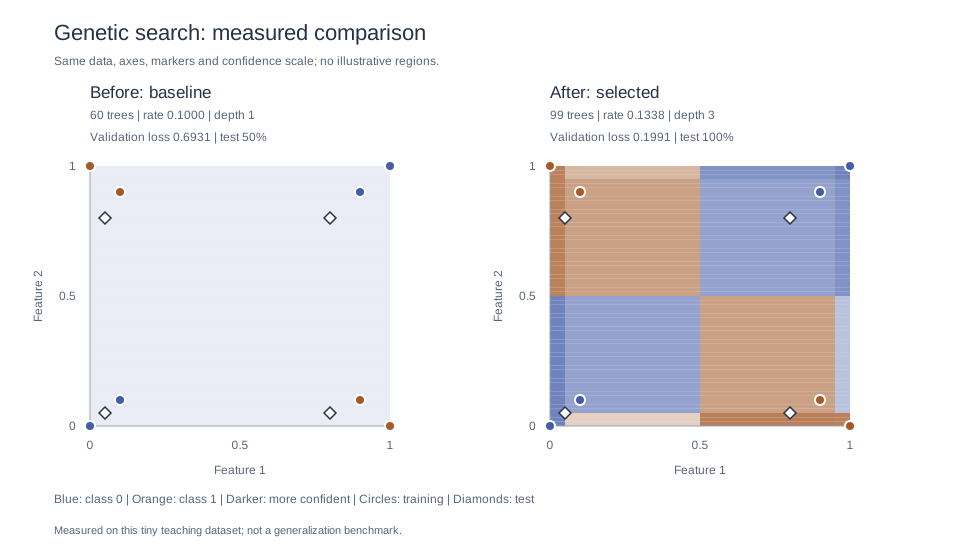
Run the downloaded Python file with a current CoolBox build that exposes opt.Optimizer. It writes boosted-tree-decision-surface.svg, boosted-tree-search-preview.svg, and the raw prediction JSON in your working directory. Both images use one shared renderer, so the baseline panel matches the earlier plot exactly apart from size.
The exporter evaluates each fitted model on the same 60-by-60 grid. Blue and orange indicate the predicted class; darker cells indicate more confident probabilities. It uses Python's standard library to write SVG, so no Matplotlib or additional plotting package is required.
Why did depth help? The shallow baseline underfits XOR. Allowing depth up to four lets the search choose trees that capture interactions between features; it selected depth three in this run. The improvement is measured, not painted in. More depth is not always better, and the four-point test set is far too small to establish general performance.
The displayed experiment compiled CoolBox's native BoostTreeClassifier and opt::GeneticSearch sources from checkout d64618ba48ce28a1704c0018b9cdf3b72d09c328. Both plots are SVG exports of its predictions, not screenshots of a plotting application. Optimizer results may vary across compiler/platform implementations.
To reproduce these exact images without a compatible CoolBox Python extension, download the saved native predictions alongside the Python script, then run:
python boosted-tree-genetic-search.py --results boosted-tree-search-results.jsonKeep exploring
Try the PCA tutorial to reduce feature dimensions, or compare the boosted ensemble with the neural-network tutorial. For regression, CoolBox also provides a BoostTree estimator with a batch prediction API.